Blog
13-10-2026
Five villains, five minutes: protect your domain
October is European Cybersecurity Month, and to mark the occasion, we invite you to take a quick test. No cheating: read the conversation below and decide what you would do.
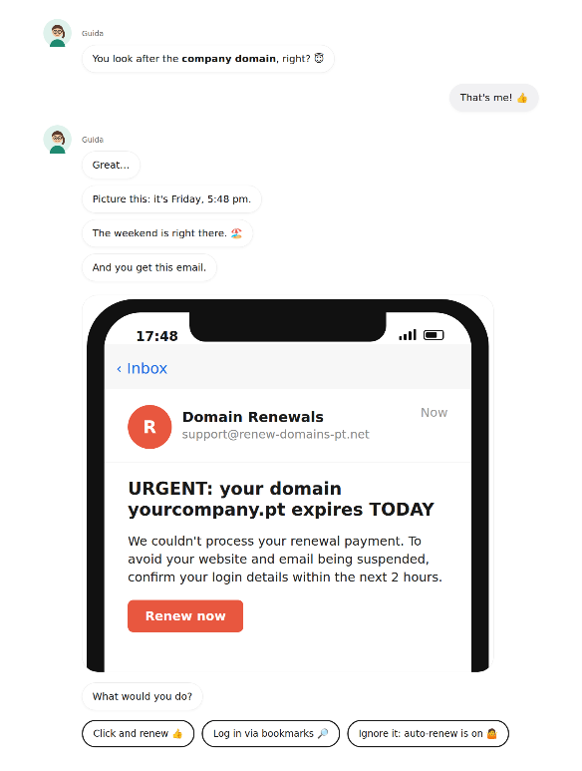
If your first instinct was to click, don’t feel bad: the email was designed to make you do exactly that. It combines urgency, fear and a conveniently placed button. Never renew through a link you receive. Instead, go directly to your account with your registrar using the web address you already know. And this is just one of the villains’ tricks.
Your domain is your digital address
Your domain is your address, your website is the house and email is the mailbox of those who live there. Whoever controls the address decides where visitors and mail go, including password recovery emails. Losing control of it can mean customers being tricked with fake invoices and emails being intercepted. And yet, most of us only think about our domain once a year, when the renewal invoice arrives.
The Five Villains
1. The renewal scammer
He’s the one behind the email above. He sends fake expiration notices that lead to a login page identical to the real one. His goal isn’t to collect the renewal fee, it’s to steal your password.
How to outsmart him: never log in to your domain account through a link you receive. Bookmark your registrar’s website (your domain registration service provider) and always access your account from there.
2. The distant cousin
He doesn’t want your domain, he wants one that looks like it. He registers yourcornpany.pt (notice the "rn” that looks like an "m”) and sends fake invoices to your customers in your name.
How to outsmart him: register the most obvious variations of your name and configure SPF, DKIM and DMARC for your domain. This makes it harder for someone to impersonate you.
3. The expired domain hunter
He’s patient. He waits for you to forget to renew your domain, then registers it as soon as it becomes available. From that point on, he receives your traffic and any emails that are still being sent to you.
How to outsmart him: turn on auto-renewal and set a calendar reminder one month before the expiry date.
4. The ex who still has the key
The former agency that built your website or the nephew who "took care of it” back in 2015. The domain account is still linked to their personal email address and no one remembers the password.
How to outsmart him: the account should be registered in the company’s name and linked to a generic email address that several people can access (for example, domains@). Whenever someone leaves the company, review who has access to that email account.
5. The password opportunist
You’ve never met him. He tries passwords exposed to data breaches until one works. If yours is the same one you used on a forum in 2019 and you don’t have a second authentication factor enabled, there’s a good chance he’ll get in.
How to outsmart him: use a unique password, enable multi-factor authentication (MFA), and for critical domains, request a registry lock to prevent unauthorized changes.
Has it already happened? Take a breath and follow these steps
1. Contact your registrar immediately: the sooner you act, the easier it may be to reverse changes or transfers.
2. Secure your account: change your password, enable MFA and sign out of all active sessions.
3. Check your DNS records: especially those that direct your website (A/AAAA) and email (MX). If someone has changed them, your emails may be going somewhere else.
4. Notify the people who need to know: your team, customers and suppliers, especially if there is a risk of fake invoices or emails being sent in your name.
5. Ask for help: if it is a security incident, report it to the National Cybersecurity Centre.
Note: part of this article was generated with the assistance of artificial intelligence and reviewed by the author.
Please note: the articles on this blog may not convey the opinion of .PT, but of its author.
Back to Posts